
Article
14 min read
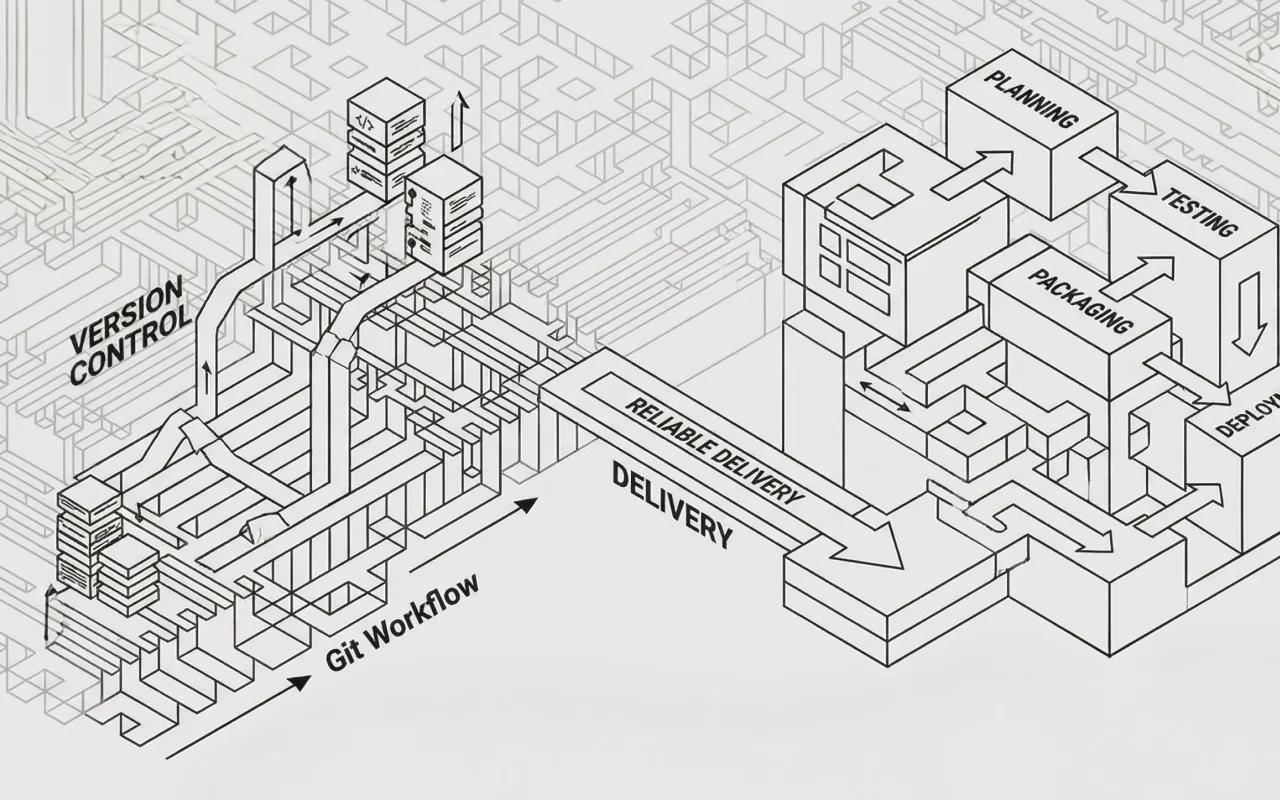
Modern software development moves fast. Teams push updates daily, features evolve constantly, and bugs need fixing immediately. Yet somehow, the software you use stays stable and functional. Two processes make this possible: version control and release management.
Version control tracks every change made to code—who changed it, when, and why. Release management takes those tracked changes and coordinates their path to users through testing, packaging, and deployment.
These aren't separate workflows. They're interconnected systems that depend on each other to deliver reliable software at speed.
Understanding version control
What it is and why it matters
Imagine working on a document with ten colleagues. Without a system to track who made which edit, you'd quickly end up with a mess.
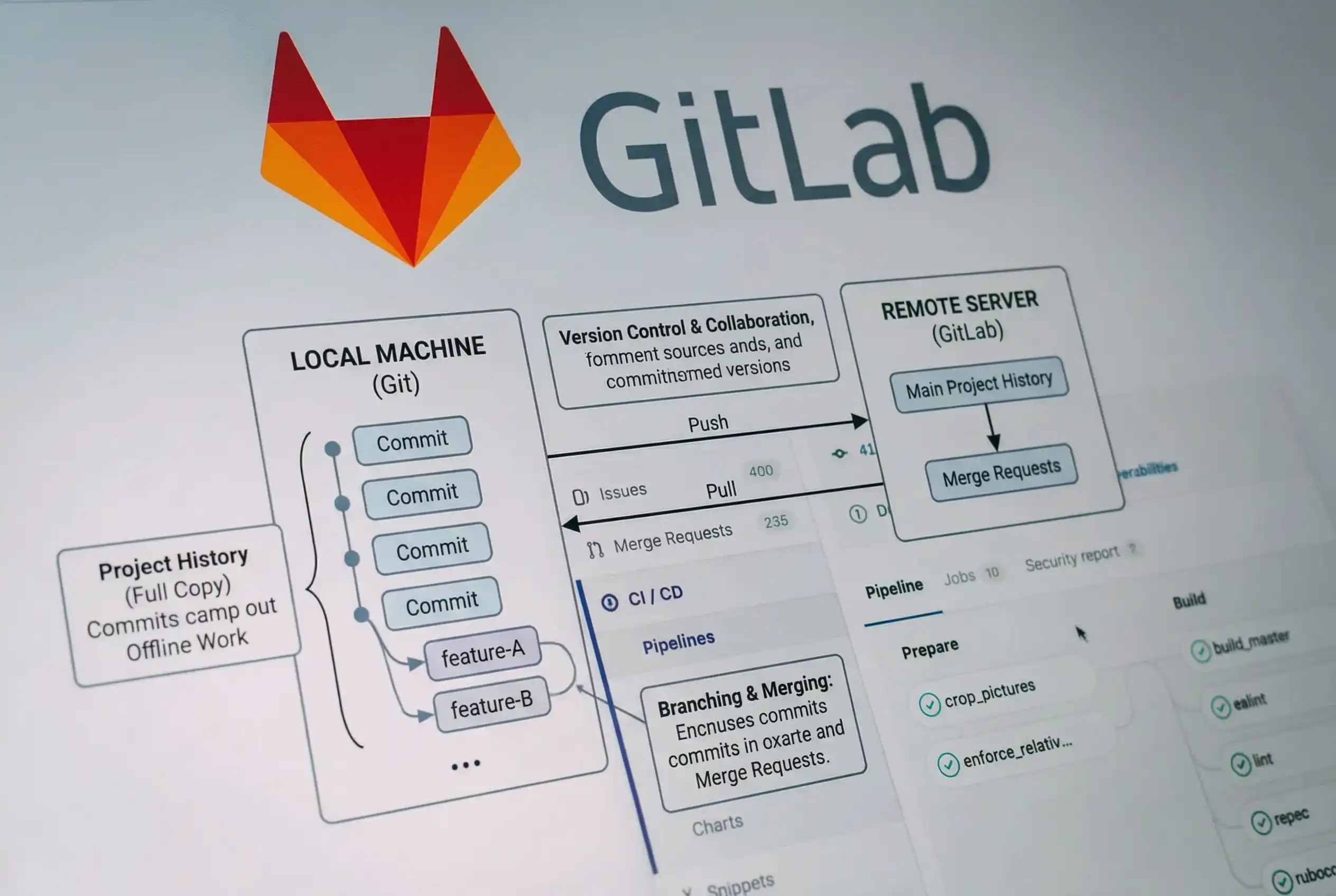 Version control solves that problem. It keeps a record of all the edits with the person's name and the date and time. So if something goes wrong, you can easily identify what changed and quickly get things working again.
How Git changed everything
There are a few different version control systems out there, but Git is the most popular these days for modern software development. Linus Torvalds created Git in 2005. Git uses a distributed model where every developer has a complete copy of the project history on their machine.
This architecture has many benefits:
Offline capability. Developers can commit changes, create branches, and review history without network access.
Speed. Operations like commits, diffs, and merges happen locally, making them nearly instantaneous even for large projects.
Flexibility. Multiple developers can work on different features simultaneously through branching, then merge their work when ready.
Data integrity. Git uses cryptographic hashing to ensure that project history cannot be altered without detection.
The core concepts
Repositories. A Git repository contains all project files plus the complete history of changes. You can clone a repository to create a local copy, work on it independently, then sync changes back to the original.
Commits. A commit is a snapshot of your project at a specific point in time. Each commit includes a unique identifier, a message describing what changed, and metadata about who made the change and when.
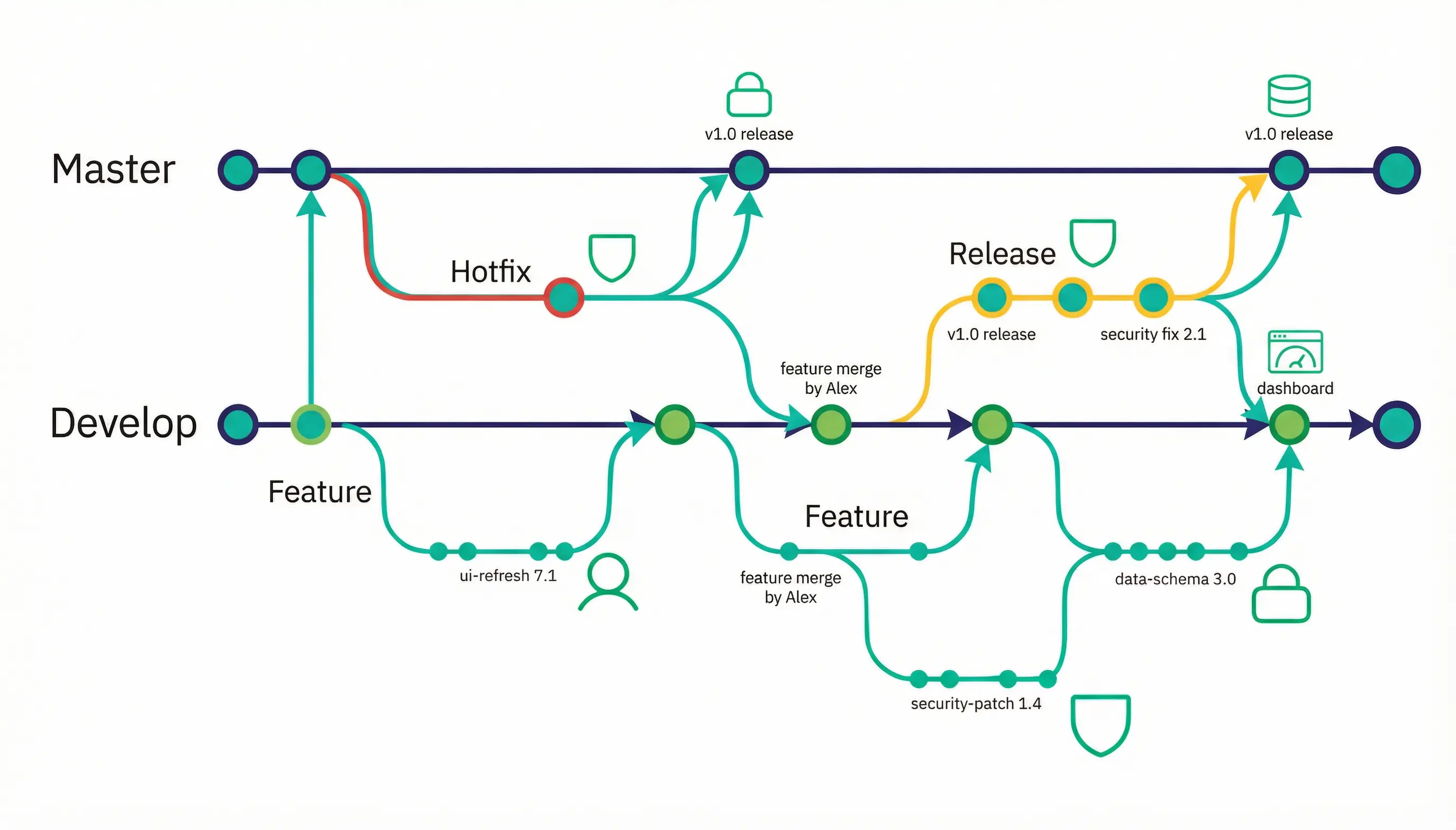
Branches. Branches allow parallel development. You might create a feature branch to build new functionality while the main branch continues receiving bug fixes. When your feature is complete, you merge it back.
Remote repositories. Services like GitHub, GitLab, and Bitbucket host repositories in the cloud. Teams use these as centralized locations to share code, review changes, and coordinate work.
A basic Git workflow
Here's how version control looks in practice:
# Clone a repository to your local machine
git clone https://github.com/team/project.git
# Create a new branch for your work
git checkout -b feature/user-authentication
# Make changes to files, then stage them for commit
git add src/auth.js
# Commit your changes with a descriptive message
git commit -m "Add user authentication system"
# Push your branch to the remote repository
git push origin feature/user-authentication
# After review, merge your changes into the main branch
git checkout main git merge feature/user-authentication
Such a workflow ensures that nothing gets lost, that everything is recorded, and that changes are checked before they reach the finished product.
Benefits
Recovery from mistakes. Accidentally deleted a file? Introduced a bug? Version control lets you roll back. What might have been a catastrophic error becomes a minor inconvenience.
Good principles of collaboration. When multiple people modify the same code, version control tracks their changes independently. If two developers edit the same file, Git flags the conflict so they can resolve it manually.
Accountability and context.Every change links to a person and a commit message. When someone encounters confusing code, they can trace it back to understand the original intent.
Quality through review. Modern Git workflows incorporate pull and merge requests—formal reviews where teams examine proposed changes. This catches bugs, improves code quality and spreads knowledge across the team.
Experimentation with 0 risk. Developers can try refactoring or new features on branches without affecting the stable code. If an experiment fails, the branch is deleted. If it succeeds, it is merged.
Understanding release management
From Code to Users
Writing code is only half the job. That code needs to reach users in a form they can actually run. Release management handles this transition through planning, testing, deployment, and monitoring.
Without it, even perfectly tracked code changes create chaos. Features ship half-finished. Bug fixes introduce new bugs. Users receive updates at random intervals with no documentation of what changed.
The 4 stages
Planning determines which ships. Not every completed change belongs in every release. Planning involves reviewing work, checking dependencies, assessing risk, and setting a target date.
Testing validates integration. Features might work alone but fail when combined. Testing in a production-like environment catches these issues before they reach users.
Deployment goes into production. Depending on the project, deployment might mean publishing to an app store, updating a web service, or releasing a package to NPM. Modern deployments often include staged rollouts, error monitoring and the ability to roll back quickly if problems emerge.
Review completes the cycle. After deployment, teams monitor error rates, performance metrics and user feedback. This information informs planning for the next release.
Manual release management
In a manual process, humans document changes and coordinate releases through checklists and communication.
Maintain a CHANGELOG.md file in your project root. When developers open pull requests, they add entries describing their changes. Reviewers verify these entries exist and make sense. When it's time to release, the release manager reviews the accumulated changes, updates version numbers, creates a git tag, and publishes the release. The format:
## [Unreleased]
### Added- Two-factor authentication for user accounts
- Export data feature in user dashboard
### Fixed
- Login button not responding on iOS Safari
- Email notifications duplicating on password reset
### Changed
- Updated privacy policy link in footer
- Improved mobile navigation performance
### Removed Deprecated v1 API endpoints
- Deprecated v1 API endpoints
On release day, change [Unreleased] to [1.3.0] - 2024-03-15, create a new [Unreleased] section above it, and you have a complete changelog.
Trade-offs: Give people complete control over their messages. Changes are described in simple language that users will understand, not technical words. But it requires discipline – people forget to update the changelog, and inconsistency creeps in.
Automated release management
Automation generates changelogs and manages versioning based on commit messages and git tags.
Teams adopt a commit message convention like Conventional Commits. Every commit starts with a type prefix:
feat: add two-factor authentication
fix: Safari login button issue
docs: update API documentation
chore: upgrade dependency versions
Tools like Semantic Release, auto-changelog, or git-cliff can read these messages, put them into groups based on type, and create a formatted changelog. These tools are set up to run automatically when changes are merged.
Trade-offs: It is important to keep messages consistent and quick, but they still need to be checked by a person.
When to release
Release timing depends on your project's needs and your team's structure.
Release at the end of a sprint or milestone. Development cycles are time-boxed (usually two weeks) with a release. Everything finished during the sprint is shipped together. This provides a predictable release cadence.
Release at the end of a build. Ship when a significant set of changes is complete and tested. More flexible than fixed schedules, but clear criteria for "ready" are needed.
Scheduled downtime or low-traffic periods. Some systems have maintenance windows. Releases happen during these windows to minimise disruption.
Critical bugs require emergency hotfixes. These bypass normal testing for speed.
Versioning. What do the numbers mean?
Version numbers communicate information. Two major systems exist.
Semantic Versioning (SemVer)
Format: MAJOR.MINOR.PATCH (e.g., 2.4.1)
MAJOR changes when you break backward compatibility. Users must change their code to upgrade.
MINOR changes when you add functionality without breaking existing features. Users can upgrade safely.
PATCH changes when you fix bugs without adding features. Users should upgrade immediately.
Example progression: 1.0.0 → 1.1.0 (new feature) → 1.1.1 (bug fix) → 2.0.0 (breaking change)
Best for: Libraries, frameworks, APIs, and anything with external dependencies where compatibility matters.
Calendar Versioning (CalVer)
Format: YYYY.MM.DD or similar date-based scheme (e.g., 2024.03.15)
Numbers reflect when the release happened, not what changed. Tells users how current their software is.
Best for: Applications that update continuously without public APIs, projects where recency matters more than compatibility.
Manual release management
The Process
Create your Changelog. After your first production release, add a CHANGELOG.md file to your project root:
# Changelog
All notable changes to this project will be documented in this file.
## [Unreleased]
### Added
### Fixed
### Changed
### Removed
Define responsibilities
Developers opening pull requests write changelog entries for their changes
Reviewers verify entries exist and are clear
Release managers compile and publish changelogs during releases
Choose the versioning strategy
Developers opening pull requests write changelog entries for their changes
Reviewers verify entries exist and are clear
Release managers compile and publish changelogs during releases
Execute your release
Review all entries in the [Unreleased] section
Update CHANGELOG.md: rename [Unreleased] to [1.2.0] - 2024-03-15
Create a new [Unreleased] section at the top
Update version numbers in package files
Create a git tag: git tag v1.2.0
Push changes and tag: git push && git push --tags
Build and publish to your distribution platform
Monitor error tracking systems for issues
Automated release management
The Setup
Choose Your Tools
Semantic Release can handle everything to do with version bumping, changelog generation, git tagging and publishing. Auto-changelog can generate changelogs from the git history, and you can set it up however you like. Git-cliff offers powerful filtering and templating so you can customise it.
Adopt conventional commits
Format: type(scope): description
Types:
feat: New feature (triggers MINOR version bump)
fix: Bug fix (triggers PATCH version bump)
docs: Documentation changes
refactor: Code restructuring without behavior change
BREAKING CHANGE: In commit body or footer (triggers MAJOR version bump)
Configure the CI/CD Pipeline
Integrate your chosen tool into your deployment pipeline. For GitHub Actions with Semantic Release:
name: Release
on:
push:
branches: [main]
jobs:
release:
runs-on: ubuntu-latest
steps:
- uses: actions/checkout@v3
- uses: actions/setup-node@v3
- uses: npm ci
- run: npm test
- run: npx semantic-release
env:
GITHUB_TOKEN: ${{ secrets.GITHUB_TOKEN }}
NPN_TOKEN: ${{ secrets.NPM_TOKEN }}
When code merges to main, this workflow runs tests, analyzes commits since the last release, determines the new version, generates the changelog, creates a git tag, and publishes the package.
Review and Refine
Even with automation, review generated changelogs before they reach users:
Do commit messages accurately describe changes?
Will users understand the technical terminology?
Are breaking changes clearly highlighted?
After a few releases, get feedback from the team and change your conventions as needed.
How do version control & release management go together?
These processes create a reinforcement loop.
Version control enables confident development, since every change is tracked and reversible, enabling developers to move faster. They can experiment, refactor aggressively, and merge frequently, because they can always recover any mistakes.
Release management enables confident delivery, since a process is in place for testing and deploying changes, meaning teams can ship regularly without fear. Users receive updates on predictable schedules with clear documentation.
Together, these practices enable sustainable velocity. Fast development without disciplined releases creates chaos. Careful releases without version control create bottlenecks. Combined, they let teams maintain high speed while keeping quality high and risk low.
Benefits
For solo developers, these practices provide future-proofing; in six months, the reasons for certain decisions are forgotten. Version control preserves that context. Release management ensures your users can access your improvements.
For teams, these practices provide coordination mechanisms that scale. Multiple people can work on the same codebase without constant communication overhead since the systems detect and integrate conflicting changes automatically.
For stakeholders and users, these practices provide predictability. Updates arrive on known schedules. Changes are documented clearly. Problems can be diagnosed and rolled back quickly.
Conclusion
The most important point to remember is that version control and release management are essential for any software engineering project, no matter how big or small.
Version control lets you go back in time and see earlier versions of your code. Every change is tracked, every decision is saved, and every mistake can be fixed.
Release management provides a reliable path to users. It makes sure that changes are tested, documented, and delivered on time.
They let you move quickly without breaking anything. Mistakes become chances to learn instead of disasters
Start simple. Git is free. A changelog is simply a text file. As your project grows, add automation. The important thing is to start now. The habits you build at the start will get better over time and help you to make steady progress.
Share this article on:
Related articles
Article
Programming Languages
Software Development
7 min read
The world of Data Sciences’ is an ever-changing place, new applications and requirements appear on a daily basis. With all that, a professional SQL-guru who can optimize their interactions with databases is valued in his weight in gold. Luckily for us we have just such master. In this post we hope to explore the world of ORMs (particularely Django ORM vs SQL Alchemy) with our Python specialist and get his opinion on which he prefers! And provide some nifty examples to boot.
08 Mar 2021
Article
Data Analytics & AI
Software Security
8 min read
We’re talking about data privacy in all its glory – why it matters to you and your customers, and where it’s all heading in the future. Because this is a part of a series, we’ll try and focus mostly on the aspects that affect us in the eCommerce domain! Let’s discuss why there’s so much hubbub around the topic of data privacy. This is not to say this discussion is anything new for the world, it’s been brought up countless of times, and the issue of “government spying” on you is as old as the idea of structured government is.
18 Feb 2022